

Sales Navigator URL Converter
Convert messy Sales Navigator links into clean LinkedIn profile or company URLs.
Want to convert your URLs at scale and enrich your data?
Evaboot automatically converts all your Sales Navigator URLs while exporting, and enriches your lists with LinkedIn profile data and verified emails.
Trusted by +3,500 companies turning Sales Navigator searches into qualified leads





What do you like best about Evaboot? It manages to find email leads very well. What do you dislike about Evaboot? Not sure about its security and data storage. What problems is Evaboot solving and how is that benefiting you? Finding email of my LinkedIn leads.

Nadia Fadhila A.
Co-Founder, Small-Business (50 or fewer emp.)
Great tool

Terrance McMahon
What do you like best about Evaboot? Exctraing leads from sales navigator very easy What do you dislike about Evaboot? Nothing my experience is perfect for EVaboot What problems is Evaboot solving and how is that benefiting you? Sales Navigator extracting data

Aya S.
Inside Sales Consultant-MEA, Mid-Market (51-1000 emp.)
Very Useful

DdNicholas
What do you like best about Evaboot? Easy to integrate and use, user-friendly What do you dislike about Evaboot? N/A, everything went well and worked perfectly What problems is Evaboot solving and how is that benefiting you? Downloading Linkedin Navigator Contacts

Evelina G.
Co-Founder & CBDO @ Pryv SA: Personal Data and Privacy, Small-Business (50 or fewer emp.)
Great product!

Alex Ciuro
What do you like best about Evaboot? The LI Sales Nav list export has become a staple in my sales process What do you dislike about Evaboot? Nothing at this time do I dislike about it. What problems is Evaboot solving and how is that benefiting you? Helping to build lists

Drew W.
Senior Solutions Manager, Small-Business (50 or fewer emp.)
Great service!

Cormac McNally
What do you like best about Evaboot? It manages to find email leads very well. What do you dislike about Evaboot? Not sure about its security and data storage. What problems is Evaboot solving and how is that benefiting you? Finding email of my LinkedIn leads.
Nadia Fadhila A.
Co-Founder, Small-Business (50 or fewer emp.)
Great tool
Terrance McMahon
What do you like best about Evaboot? Exctraing leads from sales navigator very easy What do you dislike about Evaboot? Nothing my experience is perfect for EVaboot What problems is Evaboot solving and how is that benefiting you? Sales Navigator extracting data
Aya S.
Inside Sales Consultant-MEA, Mid-Market (51-1000 emp.)
Very Useful
DdNicholas
What do you like best about Evaboot? Easy to integrate and use, user-friendly What do you dislike about Evaboot? N/A, everything went well and worked perfectly What problems is Evaboot solving and how is that benefiting you? Downloading Linkedin Navigator Contacts
Evelina G.
Co-Founder & CBDO @ Pryv SA: Personal Data and Privacy, Small-Business (50 or fewer emp.)
Great product!
Alex Ciuro
What do you like best about Evaboot? The LI Sales Nav list export has become a staple in my sales process What do you dislike about Evaboot? Nothing at this time do I dislike about it. What problems is Evaboot solving and how is that benefiting you? Helping to build lists
Drew W.
Senior Solutions Manager, Small-Business (50 or fewer emp.)
Great service!
Cormac McNally
Convert Sales Navigator URL in Seconds
Sales Navigator URLs are long, messy, and hard to share. With our Sales Navigator URL Converter, you can instantly transform them into clean, standard LinkedIn profile or company URLs. Just paste your Sales Navigator link, and get a simplified LinkedIn URL ready to use in your CRM, outreach campaigns, or anywhere else.
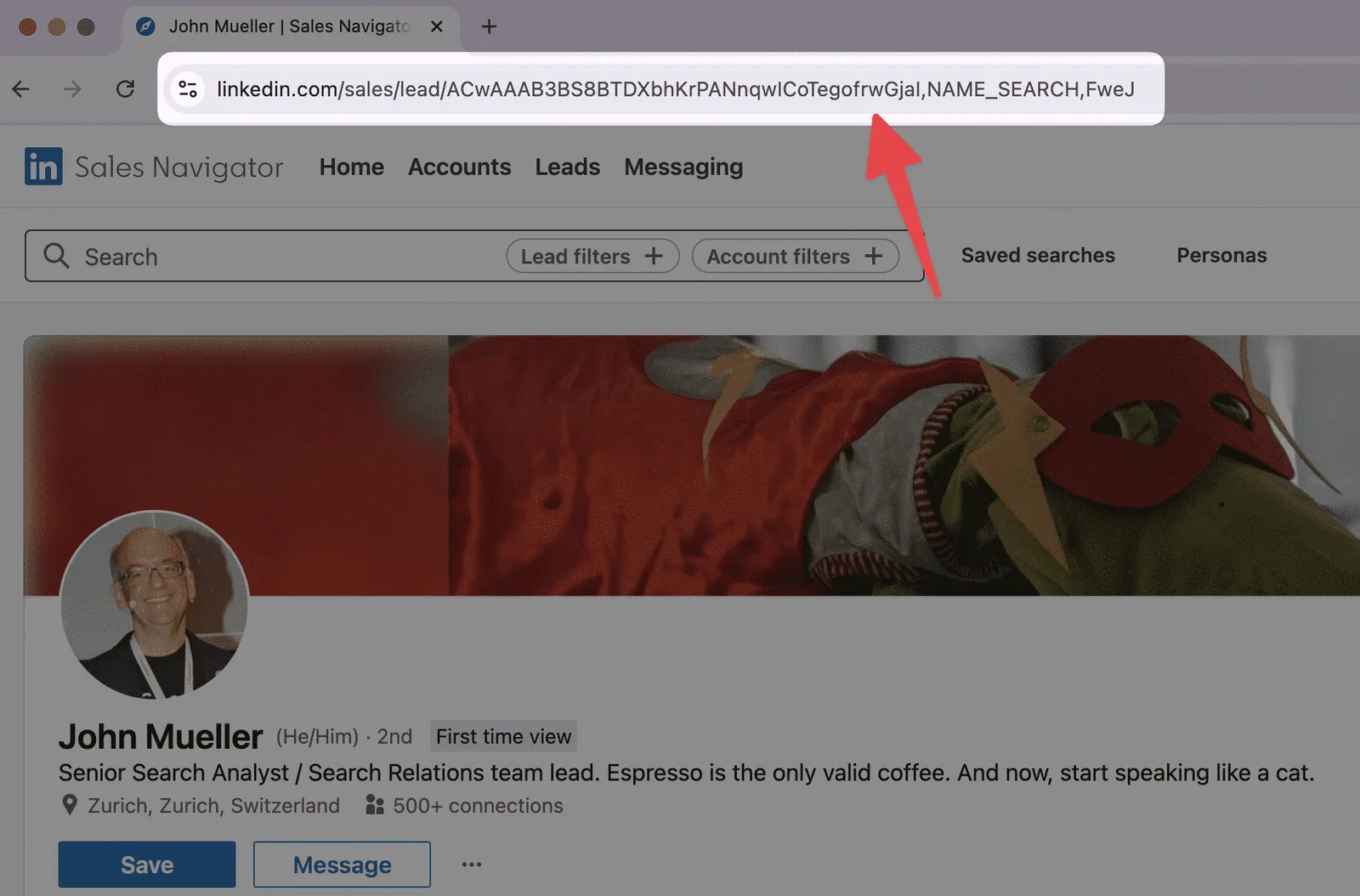
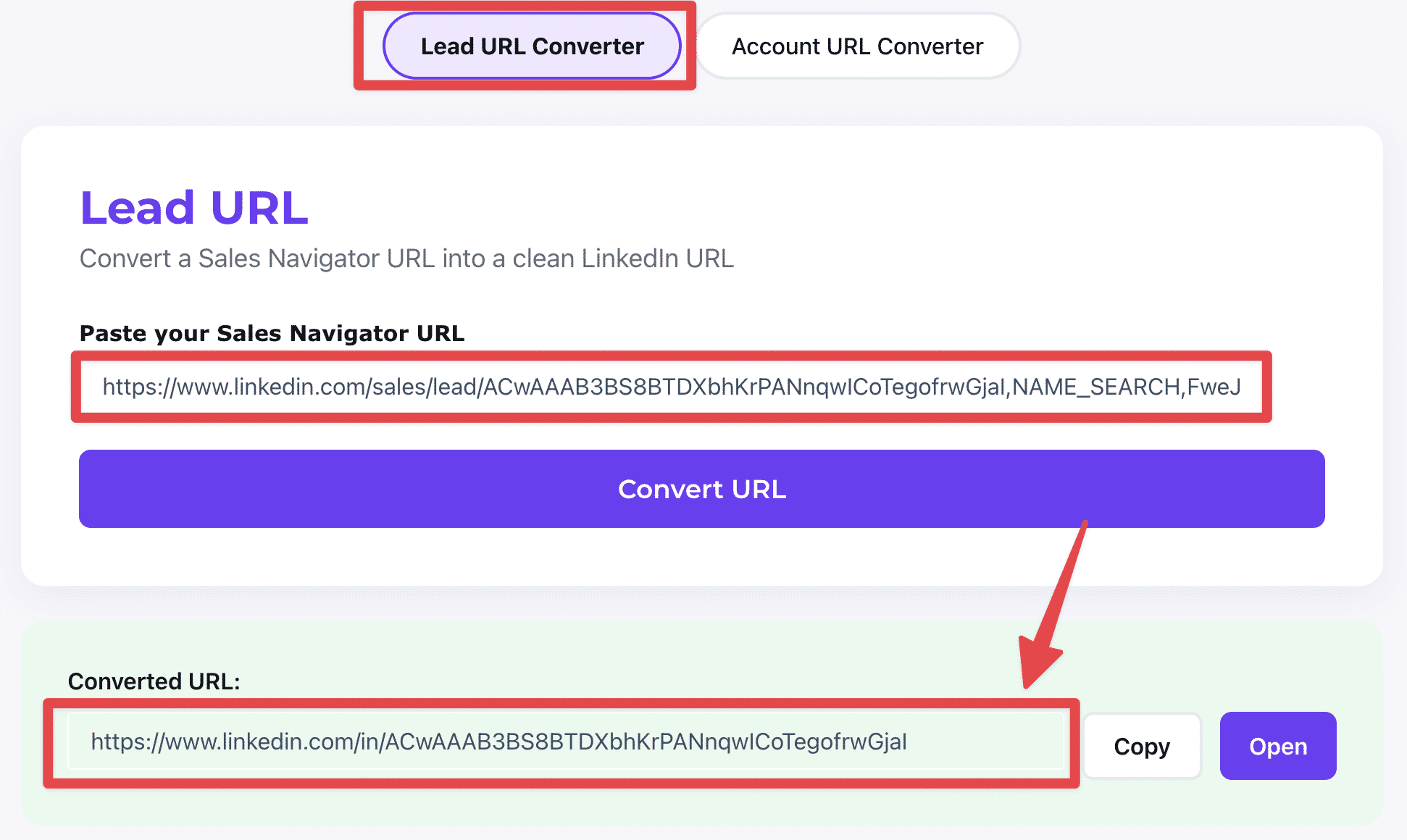
Lead URL Converter
Convert messy Sales Navigator lead profile URLs into standard LinkedIn profile URLs. These converted URLs are easier to share, more recognizable, and integrate smoothly with CRM and sales tools.
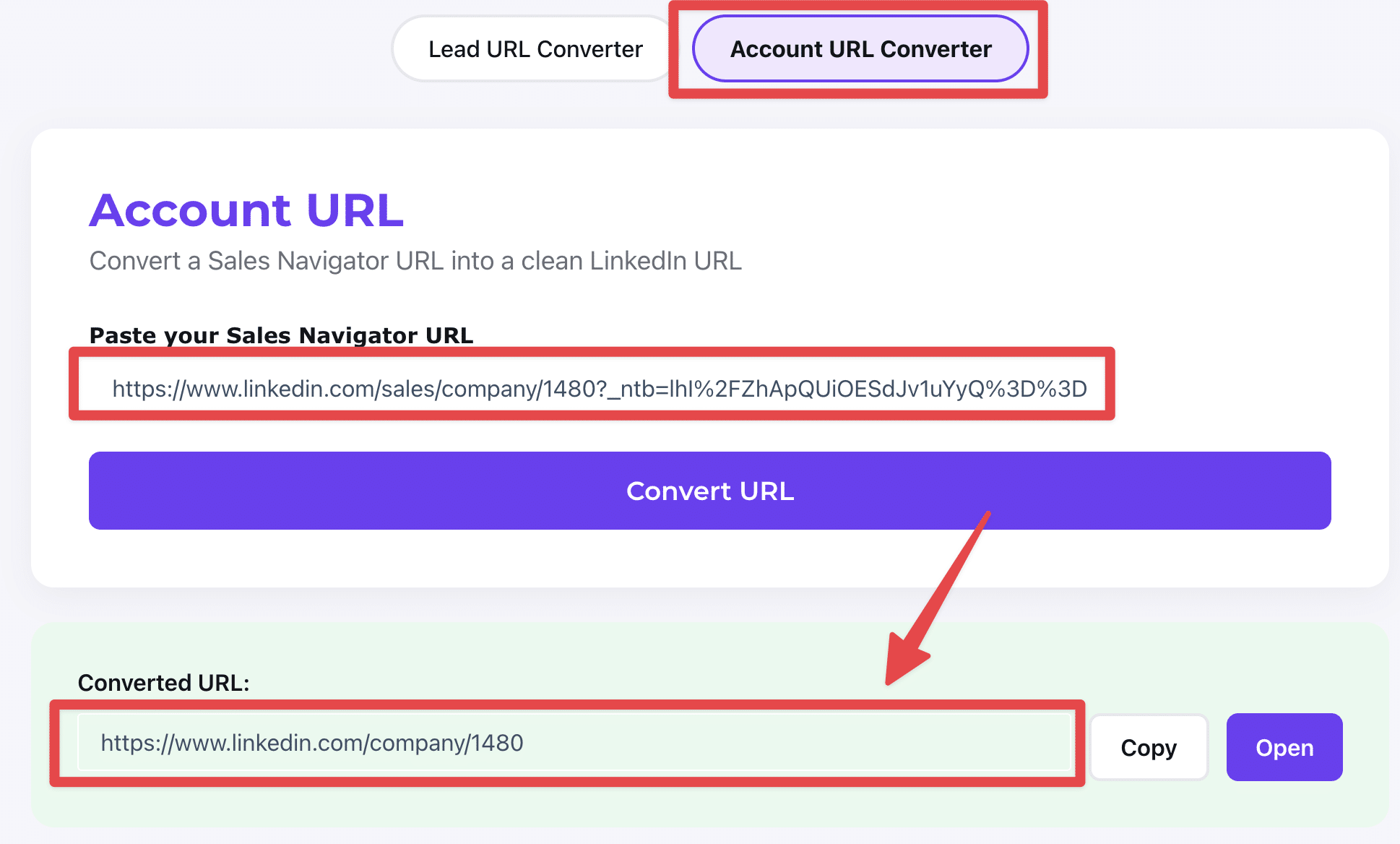
Account URL Converter
Turn Sales Navigator company URLs into clean LinkedIn company profile links. This makes your account lists simpler to manage and ensures compatibility with third-party tools and automations.
What This Tool Does
- → Clean conversions: Instantly transform messy Sales Navigator URLs into standard LinkedIn profile or company URLs.
- → Lead or Account mode: Switch between lead profiles and company pages depending on your prospecting needs.
- → Copy and open: Use the converted URL in your browser to be redirected to the clean LinkedIn link, ready to save or use in your CRM.
Why Use It?
- → Simplify sharing: Short, recognizable URLs are easier to share and inspire more trust.
- → Boost efficiency: Standard LinkedIn links integrate better with CRMs and outreach tools.
- → Scale faster: Export your Sales Navigator lists with Evaboot and get LinkedIn URLs at scale.
Build Smarter Searches, Find Better Leads
Learn how to use Sales Navigator filters, Boolean search, and exports to scale your prospecting.
How To Convert Sales Navigator URL to LinkedIn URL?
Learn how to convert Sales Navigator URL to LinkedIn URL with these 3 techniques.
How to use LinkedIn Sales Navigator to generate leads?
Everything you need to know to become a LinkedIn Sales Navigator expert and generate more leads.
How To Export Lead Lists from LinkedIn Sales Navigator?
Learn how to create clean lead lists in one click from LinkedIn Sales Navigator with the Chrome extension Evaboot.
Frequently Asked Questions
What is a Sales Navigator URL Converter?
A Sales Navigator URL Converter is a free tool that transforms LinkedIn Sales Navigator profile or company URLs into standard LinkedIn URLs you can share, store, or integrate into your workflows.
How does the URL Converter work?
Simply paste your Sales Navigator URL into the tool, and it will generate a LinkedIn URL. When you open the converted link in your browser, LinkedIn automatically redirects it to the clean public profile or company page.
What's the difference between Lead and Account URL Converter?
The Lead Converter transforms Sales Navigator profile links into LinkedIn profile URLs. The Account Converter does the same for company pages, turning Sales Navigator company URLs into standard LinkedIn company links.
Does the Converter give me the final public LinkedIn URL with the username/slug?
Not directly. The Converter produces a functional LinkedIn ID-based URL. When you open it in your browser, LinkedIn redirects it to the clean version (e.g., /in/username/ or /company/brand/).
Why convert Sales Navigator URLs?
Sales Navigator links are long, messy, and often break outside of LinkedIn. Clean URLs are easier to share, boost trust, improve click-through rates, and integrate better with CRMs and automation tools.
Why should I use Evaboot after converting my URLs?
Converting URLs is only the first step. With Evaboot, you can export entire Sales Navigator searches, clean your lead data, and enrich profiles with verified business emails—all in one click.
More Questions?
Visit FAQExport Leads From Sales Navigator


Create a clean B2B email list from LinkedIn Sales Navigator in just one click with the Evaboot Chrome Extension.
Export a list now