

LinkedIn Boolean Search Tool
Unlock ultra-targeted prospects in seconds with our free LinkedIn Boolean search tool.
Please wait, this may take 30–50s…
Want to export this list with verified emails?
Sign Up on EvabootWant to turn your Boolean search into real leads?
Don't stop at Boolean Search. Export your Sales Navigator lists with Evaboot to get clean data and verified emails for your prospecting.
Trusted by +3,500 companies turning Sales Navigator searches into qualified leads





What do you like best about Evaboot? It manages to find email leads very well. What do you dislike about Evaboot? Not sure about its security and data storage. What problems is Evaboot solving and how is that benefiting you? Finding email of my LinkedIn leads.

Nadia Fadhila A.
Co-Founder, Small-Business (50 or fewer emp.)
Great tool

Terrance McMahon
What do you like best about Evaboot? Exctraing leads from sales navigator very easy What do you dislike about Evaboot? Nothing my experience is perfect for EVaboot What problems is Evaboot solving and how is that benefiting you? Sales Navigator extracting data

Aya S.
Inside Sales Consultant-MEA, Mid-Market (51-1000 emp.)
Very Useful

DdNicholas
What do you like best about Evaboot? Easy to integrate and use, user-friendly What do you dislike about Evaboot? N/A, everything went well and worked perfectly What problems is Evaboot solving and how is that benefiting you? Downloading Linkedin Navigator Contacts

Evelina G.
Co-Founder & CBDO @ Pryv SA: Personal Data and Privacy, Small-Business (50 or fewer emp.)
Great product!

Alex Ciuro
What do you like best about Evaboot? The LI Sales Nav list export has become a staple in my sales process What do you dislike about Evaboot? Nothing at this time do I dislike about it. What problems is Evaboot solving and how is that benefiting you? Helping to build lists

Drew W.
Senior Solutions Manager, Small-Business (50 or fewer emp.)
Great service!

Cormac McNally
What do you like best about Evaboot? It manages to find email leads very well. What do you dislike about Evaboot? Not sure about its security and data storage. What problems is Evaboot solving and how is that benefiting you? Finding email of my LinkedIn leads.
Nadia Fadhila A.
Co-Founder, Small-Business (50 or fewer emp.)
Great tool
Terrance McMahon
What do you like best about Evaboot? Exctraing leads from sales navigator very easy What do you dislike about Evaboot? Nothing my experience is perfect for EVaboot What problems is Evaboot solving and how is that benefiting you? Sales Navigator extracting data
Aya S.
Inside Sales Consultant-MEA, Mid-Market (51-1000 emp.)
Very Useful
DdNicholas
What do you like best about Evaboot? Easy to integrate and use, user-friendly What do you dislike about Evaboot? N/A, everything went well and worked perfectly What problems is Evaboot solving and how is that benefiting you? Downloading Linkedin Navigator Contacts
Evelina G.
Co-Founder & CBDO @ Pryv SA: Personal Data and Privacy, Small-Business (50 or fewer emp.)
Great product!
Alex Ciuro
What do you like best about Evaboot? The LI Sales Nav list export has become a staple in my sales process What do you dislike about Evaboot? Nothing at this time do I dislike about it. What problems is Evaboot solving and how is that benefiting you? Helping to build lists
Drew W.
Senior Solutions Manager, Small-Business (50 or fewer emp.)
Great service!
Cormac McNally
Generate LinkedIn and Sales Navigator Boolean Search Operators in Seconds
Skip the syntax headache and focus on what really matters: finding the right leads. With our Boolean Generator, simply describe your audience in natural language and instantly get a clean Boolean string ready to paste into LinkedIn or Sales Navigator, and even LinkedIn Recruiter.
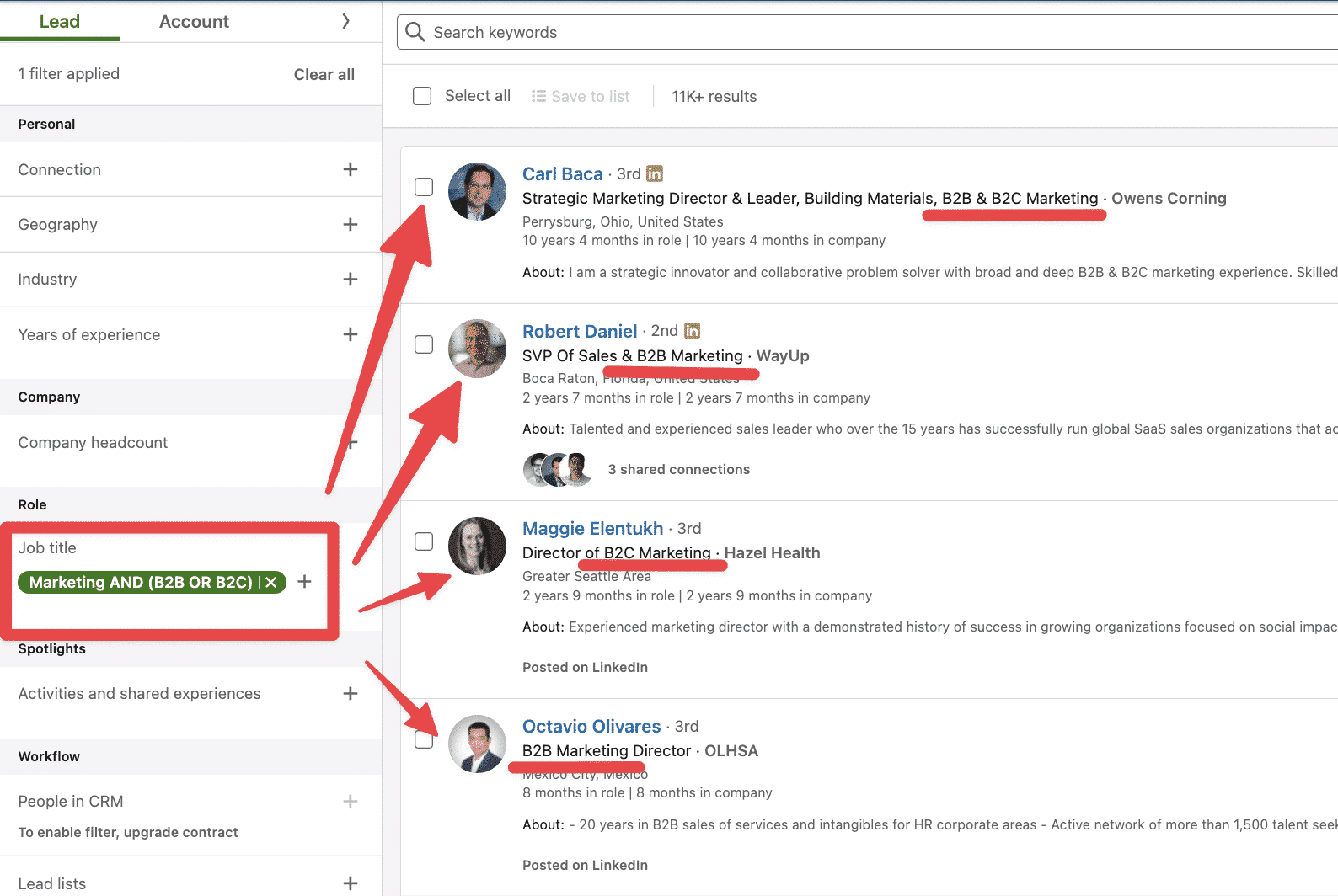
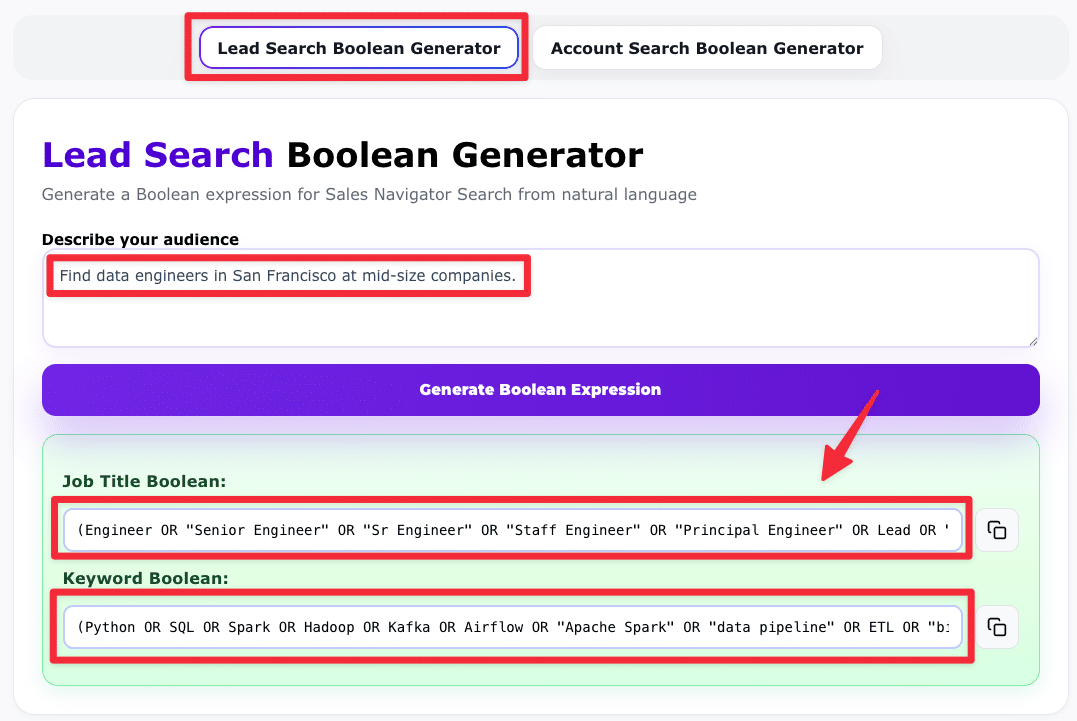
Lead Search Boolean Generator
Create Boolean expressions for LinkedIn, Sales Navigator Lead Searches or LinkedIn Recruiter directly from natural language.
Example: "Find data engineers in San Francisco at mid-size companies."
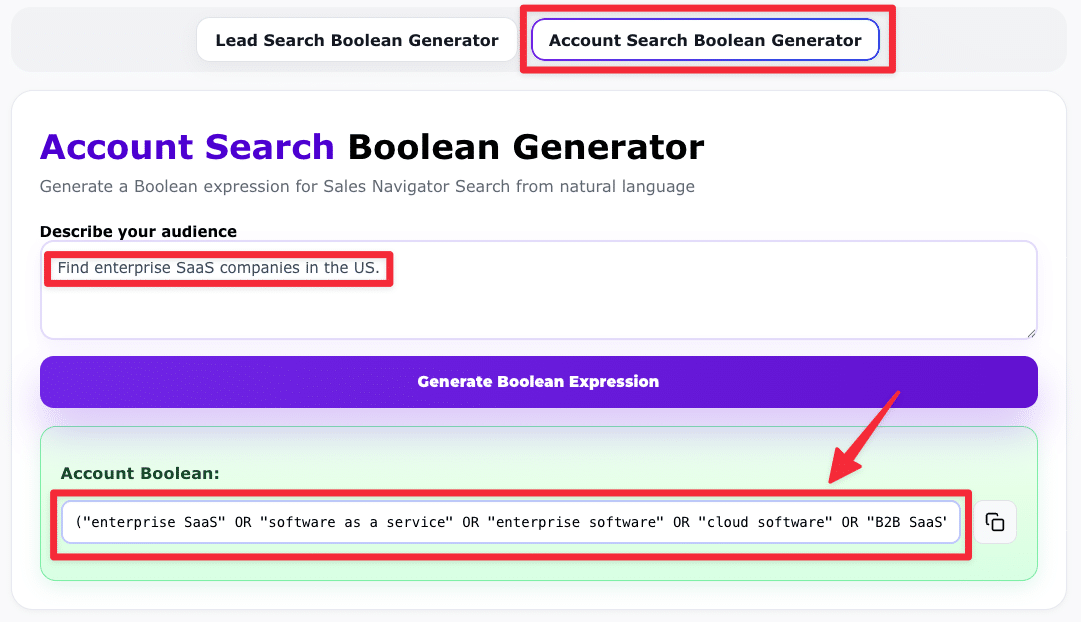
Account Search Boolean Generator
Generate Boolean strings for LinkedIn or Sales Navigator Account Searches to target companies by size, industry, or location.
Example: "Find enterprise SaaS companies in the US."
What This Tool Does
- → No more guesswork: Craft exact, powerful LinkedIn Boolean strings without memorizing syntax.
- → Lead or Account mode: Switch between Lead and Account Search depending on your prospecting goals.
- → Paste and go: One click to copy your string, paste into LinkedIn or Sales Navigator, and start searching.
Why Use It?
- → Boost precision: Automatically apply AND, OR, NOT, quotes, and parentheses for exact targeting.
- → Save time: Build smarter Boolean searches without trial and error.
- → Scale faster: Once your string works, export your Sales Navigator lists with Evaboot.
Boost Your Prospecting with Boolean Search
Learn how to build smarter LinkedIn searches and uncover hidden prospects with our expert tips.

How To Use LinkedIn Boolean Search?
Master LinkedIn Boolean search to find top leads faster. Learn how to use advanced search operators to refine results and boost your prospecting.

How to Use LinkedIn Sales Navigator Boolean Search?
Learn how to use LinkedIn Sales Navigator Boolean Search to find your prospects and reduce errors in your Sales Navigator keyword searches.
Frequently Asked Questions
What is a LinkedIn Boolean Search Generator?
A LinkedIn Boolean Search Generator is a tool that helps you build precise LinkedIn and Sales Navigator search queries using operators like AND, OR, and NOT.
How does the Evaboot Boolean Generator work?
Simply type a prompt describing your target audience (job titles, companies, industries, etc.) and select whether you want a Lead Search or an Account Search.
Do I need a LinkedIn Sales Navigator account to use it?
No. The Boolean Generator works with both the free version of LinkedIn and Sales Navigator. However, Sales Navigator allows longer strings.
Is the Boolean Search Generator really free?
Yes, the Boolean Generator is completely free. You can generate unlimited Boolean strings. But if you want to export your search results into CSV and scale your outreach, you'll need an Evaboot subscription.
Can I use the Boolean generator for recruiting?
Yes. Boolean search works for both prospecting and talent sourcing. You can paste the generated strings into LinkedIn Recruiter to filter candidates and find those matching a specific job description.
Why should I use Evaboot after generating my Boolean string?
Because Boolean search is only the first step. Evaboot lets you export your Sales Navigator leads into a CSV, get clean data and enrich your leads with verified email addresses.
More Questions?
Visit FAQExport Leads From Sales Navigator


Create a clean B2B email list from LinkedIn Sales Navigator in just one click with the Evaboot Chrome Extension.
Export a list now